

Build your own database storage engine from scratch (BitcaskDB) - Part 1
Deep dive on building your very own key-value storage engine for a database management system in C. We will be implementing the storage engine used in Riak database - Bitcask.
Introduction
Why do we need a database?
Every software application needs to process some amount of data, be it large or small. In some cases, the data is small enough to fit in the RAM i.e in memory. Storing data in RAM is not persistent i.e once the application shuts down, we also lose the data stored in the memory stack allocated for the application. In most of the real world scenarios, we would like to persist the data across multiple runs of the application. Instead of storing it in RAM, we store it on disk i.e hard drive, floppy disk, compact disk etc. In this article we will use disk to build our database engine to process data.
persistent: storing data in such a way that it can be recovered in case of application crash or application restart
What database are we going to build?
We will be storing the data in simplest format in order to process the data easily. By process I mean the operations on the data - insert, retrieve, update, remove. Key-Value database is the most simple one to think of and is very intuitive. Most of us can relate it with a hash-table like data structure but on disk. Key-value database allows it’s users to store data in key-value manner where:
key: is the unique identifier for any entry
value: is the actual entry
Intro to Bitcask
In this article we will be working on implementing the BitcaskDb specification mentioned in this paper. Bitcask is a storage engine used in Riak - which is a NoSql database. Instead of reading the paper and writing it here in different words with help of chatgpt, I will straightaway jump into the design and implementation of the database.
storage engine vs database: storage engine, as the name suggests, will be responsible for the storage and retrieval of data, whereas a database contains a storage engine, but it can also additional responsibilities like - transactions, concurrency, replication.
I recommend to read the bitcask paper. It is a tiny paper with 6 pages but will give you a better understanding of what problem it is going to solve and how. Anyways we will be covering them in this article(s) but the depth may vary.
Part 1: Design
Without understanding the design, any kind of implementation would be directionless and would require changes every time we face ambiguity. It is important to understand the design first before coming up with the implementation.
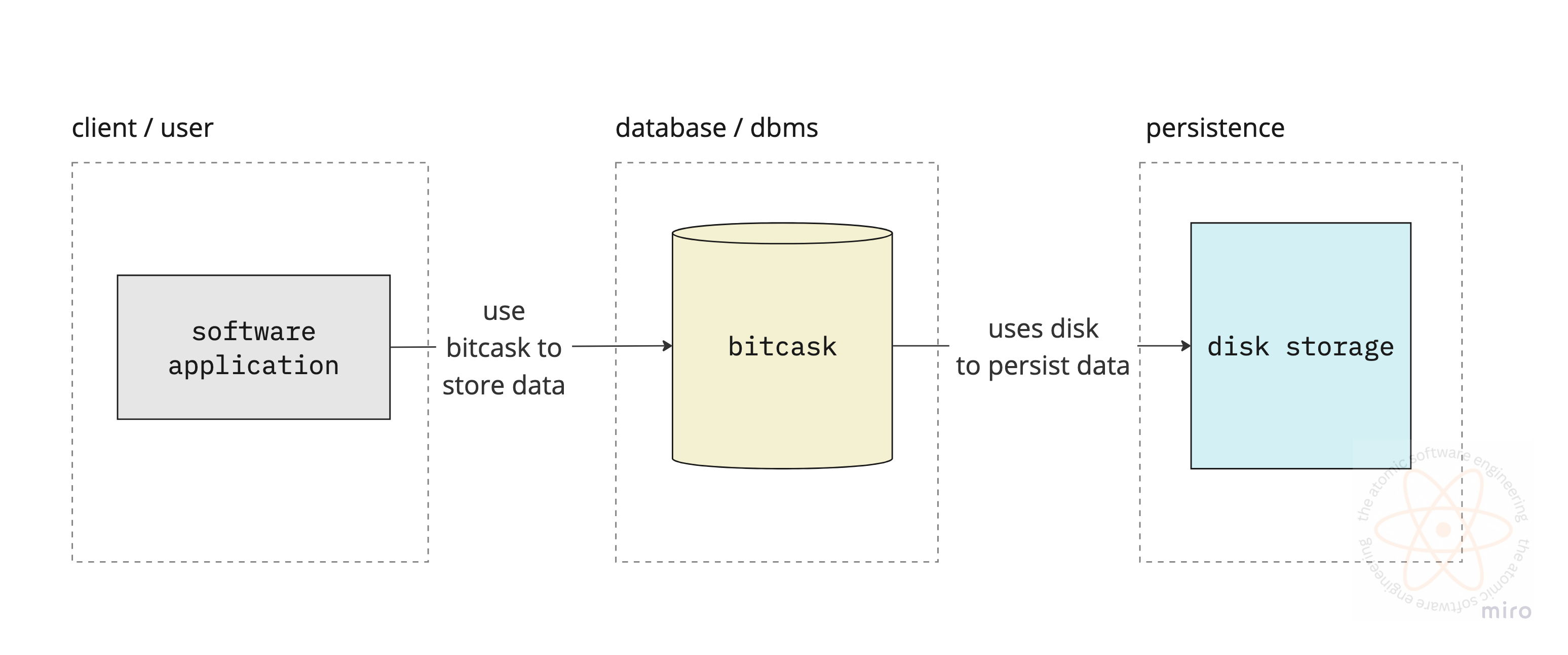
Storage
According to the bitcask paper, there are two kinds of storage layers we will be employing in this storage engine.
In-Memory Hash Table Storage
On-Disk File Storage
Well we introduced a new term - Hash Table Storage. To understand why we use in-memory hash table, we will look at how data is stored on disk. As we have established previously in this article, data stored on disk is persistent i.e won’t be lost.
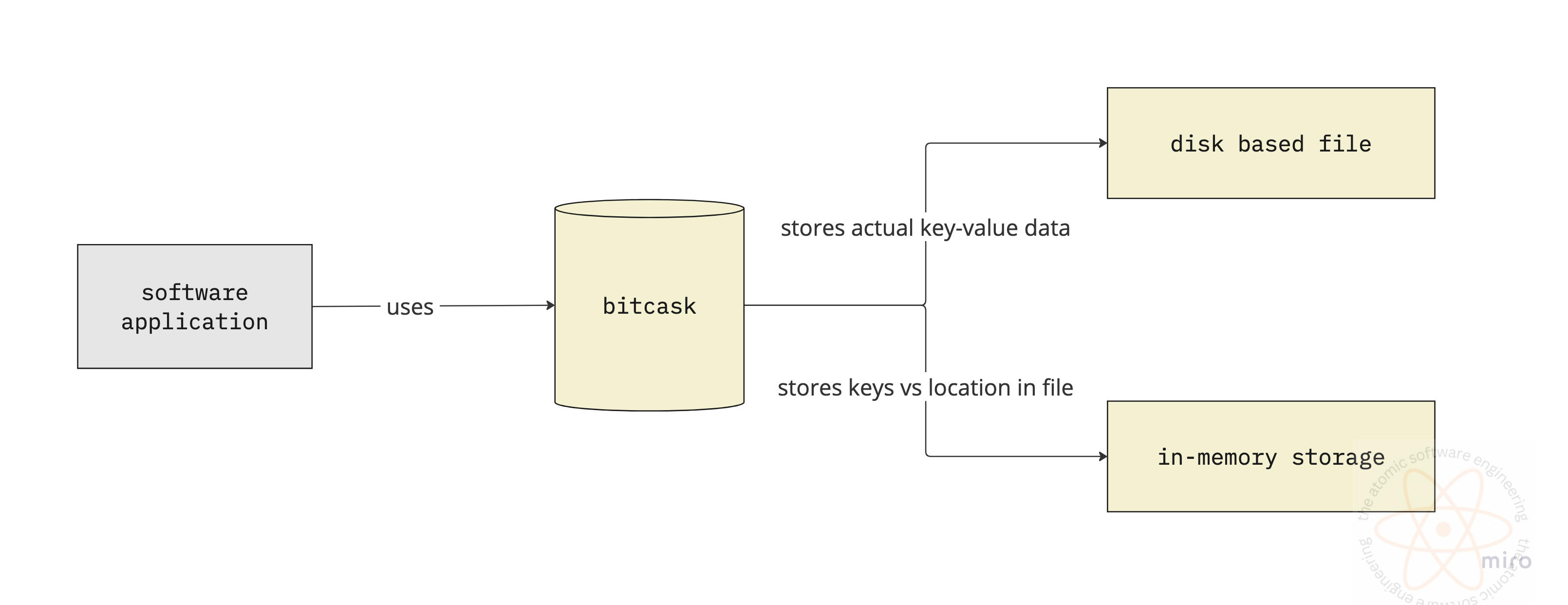
File Storage
Bitcask uses disk to store the data to ensure persistence and durability of the data. It organises this data into several files, which in turn are kept in a directory (folder) on the disk. It leverages the operating system api’s to save and load data from files.
Every bitcask file works with an active file. Every time user wants to write some data in the database, bitcask writes it in an active file. Only file can be active per instance. All the changes (writes, inserts, deletes) happen in append-only way i.e every time someone creates/updates/deletes entry from the database, it will be added a mutation record in the file. So for a key, there can be following entries:
1 entry for creation of the key
N entries for N updates on that key
1 entry for deletion of the key
Once the key is deleted, all the N+1 entries are redundant or dead entries. These keys can pile up in the file. To manage the data in the efficiently, bitcask keeps a threshold limit on size for each file i.e each file can have limited amount of data. We will see later how do we clean up the dead entries from the files.
Whenever a file reaches it’s maximum limit or is unable to ingest new entry, it is marked as archived, making it non-writable and immutable. However, it is still available for retrieving the data that is present in it.

What is stored in the file?
Bitcask stores the user provided data in the files in binary format i.e a sequence of 0s and 1s or bytes. Every time an entry is inserted in the file, before insertion it is converted to it’s binary equivalent and then written off to the disk to use the available memory efficiently.
12345 in UTF-8 takes 5bytes, where as in binary may require only 2 bytes.
Okay got it! We store the 0s and 1s, then how do we interpret this data while reading. How would we know what these 0s and 1s mean, is it the key? is it the value?
How to retrieve the binary data in the file?
To store the data in the most memory efficient way, we store it in binary format. So every key-value pair is
converted to binary format - an array containing 0s and 1s
appended at the end of the file
If we somehow know what is the size of this array and the start pointer in the file where this array is written in the file, we ca easily retrieve the data when queried by the user by:
seeking file pointer to the start pointer location of this array
reading the next N number of 0s and 1s
start offset: refers to the start pointer in the file for the particular entry
size: number of 0s and 1s written by this particular entry (usually number of bytes)
How to interpret the data which is read from the file?
Okay, let’s assume we know the start pointer and the size of the data. To interpret this data we need to decode this sequence of bytes. For example: the first N bytes represent the key, the next M bytes represent the value. Here we are decoding the byte sequence to some format or sequence.
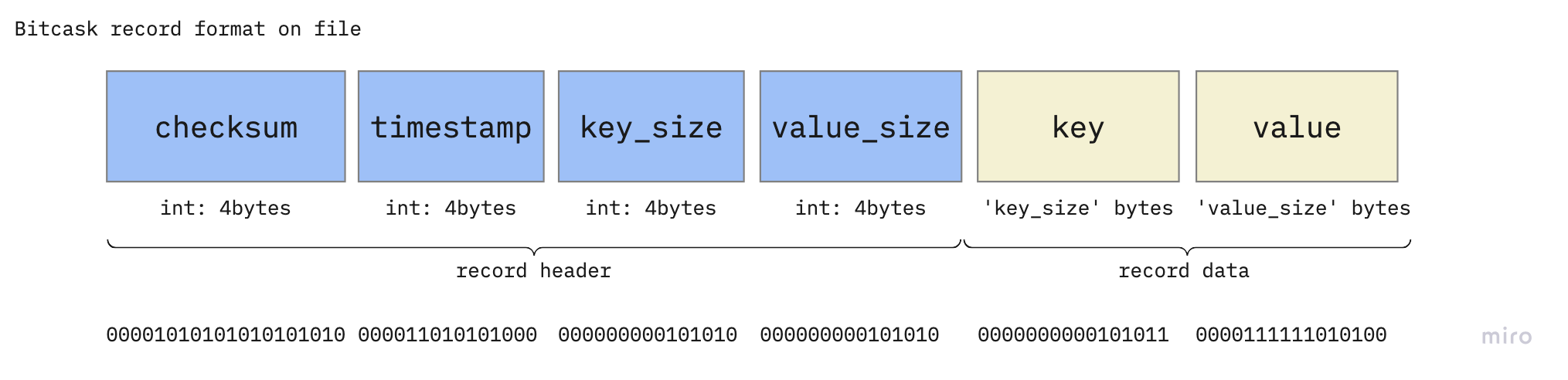
Record: Bitcask file entry format
Every key-value pair when encoded to sequence of bytes is written to the disk. In order to retrieve the data later, we will make sure the data is written in a known sequence or format. We call it the record. Every key-value pair entry in the file will be referred as Record. The record should have following elements:
timestamp: the time when this entry was created, usually in seconds.
key_size: the size of the key in bytes. This helps in interpreting how many bytes we need to read in order to decode/encode the key.
value_size: the size of the value in bytes. This helps in interpreting how many bytes we need to read in order to decode/encode the value.
key: the actual key, sequence of bytes
value: the actual value, sequence of bytes
checksum: this is a special attribute, derived from the above 5 attributes. This is used to ensure the data is not corrupted.

In-Memory Storage
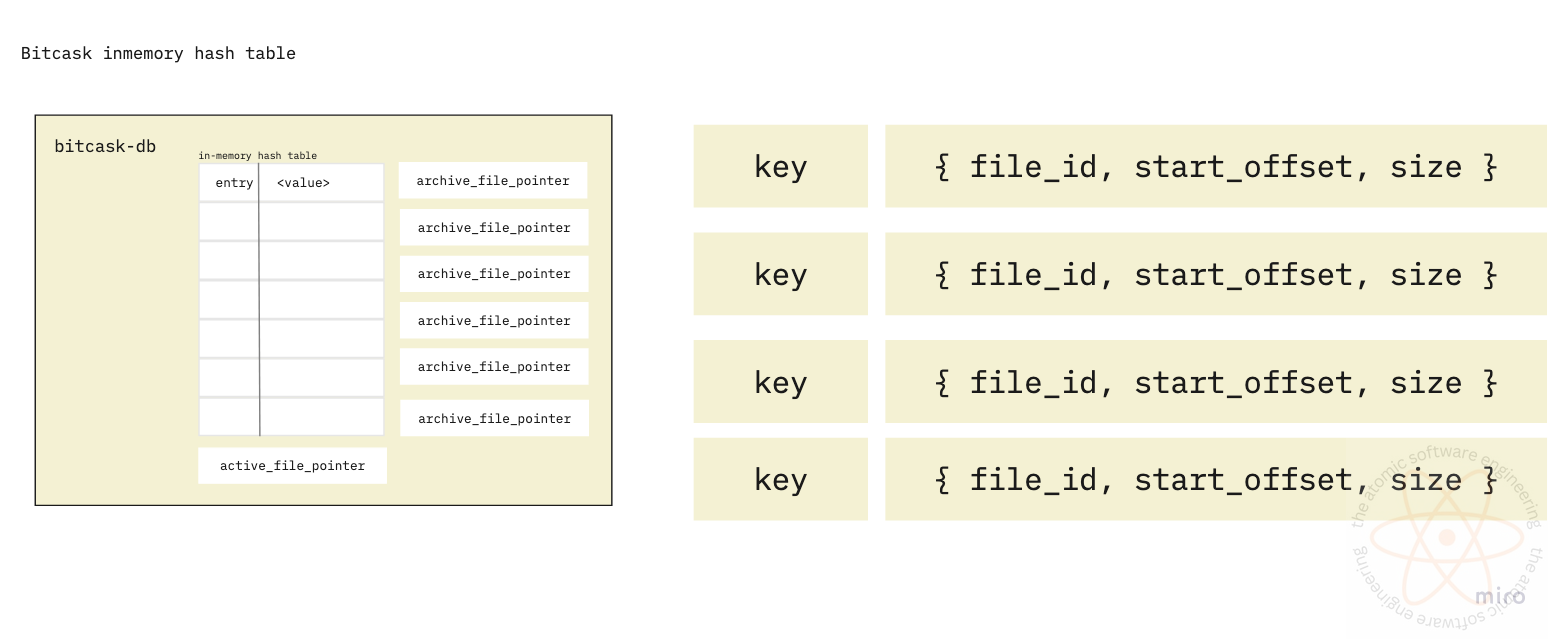
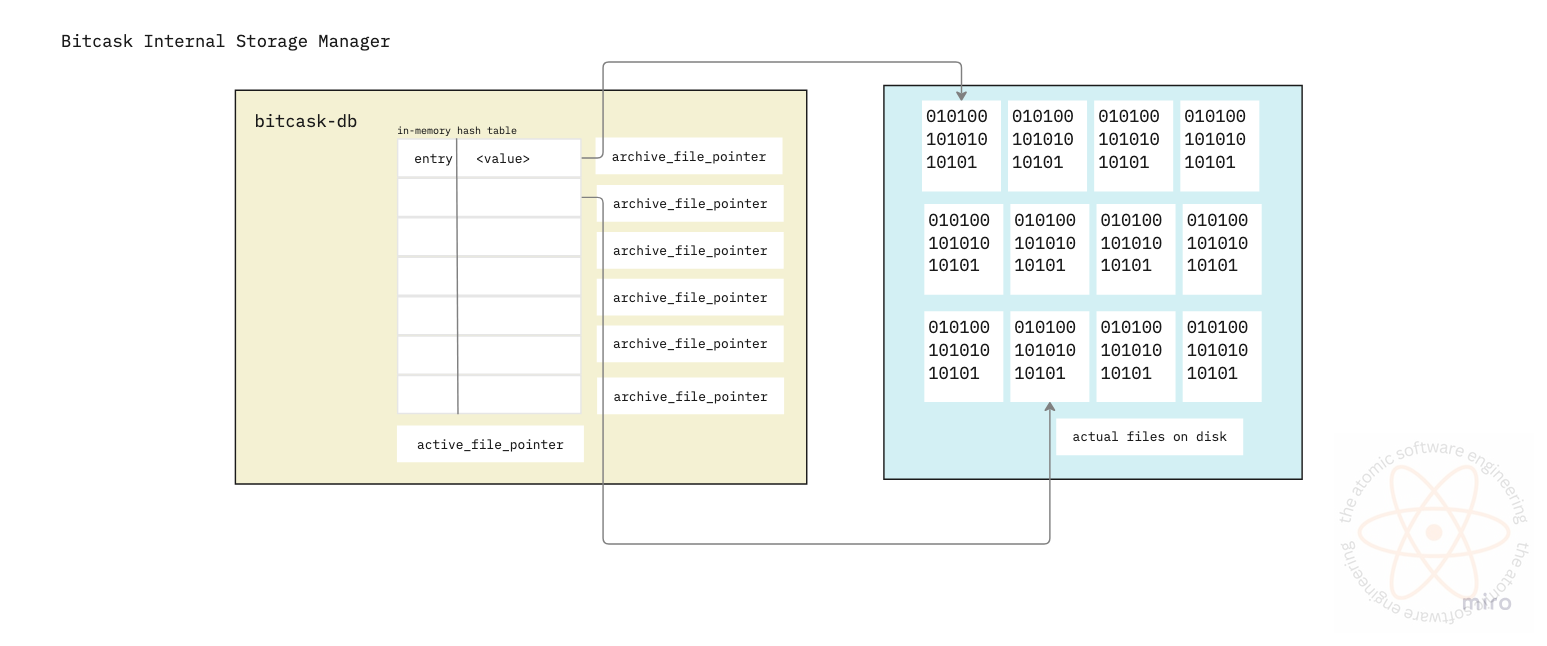
Now we know how data is organised on the disk we can read and write data from the files. We also established that if we know the size and start_offset for an entry in the file, we can retrieve it from the file using operating system’s seek operation/api. The in-memory storage will be used to store the file_id, size and start_offset, which will be used to identify the corresponding record on the disk.
Whenever the user wants to read the data for a key, bitcask first checks in the in-memory hash table and gets the metadata required to fetch the record from the file. To be available and consistent, bitcask db always keeps all the keys in memory, which might be an overhead for the RAM (memory). Also, once the bitcask db instance is shut down, the keys store in-memory are lost. Bitcask paper specifies how to rebuild this hash table, but we will go in those details later.
This in-memory storage is called the Key Directory in bitcask.
What is stored in the Key Directory?
Key Directory will be a data structure similar to a Map in java, C++ or dictionaries in python. They will store the key-value combinations. Note, the value here isn’t the actual value corresponding to the key, but the metadata of the record stored on disk.
KeyDirectory <key: data_type, value: {file_id, start_offset, size}>Whenever a data is written to the file, we insert/update the corresponding value of key in this Hash table. It looks like we should have the write-to-disk and write-to-key-directory as an atomic operation.
What’s next?
We are almost completed with the basic design and understood how bitcask storage engine organises data. Next, we will start the basic implementation of the storage engine and take a look at the low level design, which will involve the api interfaces, design patterns and code implementation.